Getting Started with Algo Trading in India: A Beginner's Step-by-Step Guide with Shoonya API
26 Aug 2026
 (A Beginner’s Blueprint: Navigating Algorithmic Trading with Zero-Brokerage APIs in India)
(Image generated by AI)
1. Introduction: What is Algorithmic Trading?
If you have ever traded in the stock market, chances are you have experienced the psychological roller-coaster of manual trading:
- Staring at a 5-minute candlestick chart for three continuous hours waiting for a breakout.
- Hesitating to click Buy on a valid setup due to the fear of losing money.
- Exiting a winning position too early out of anxiety, only to watch the stock surge another 5%.
- Falling victim to revenge trading after a loss, impulsively taking sub-optimal trades to “make the money back.”
The hardest part of trading has never been finding technical indicators—it has always been managing human emotion and execution discipline.
This is where Algorithmic Trading (Algo Trading) comes in.
+--------------------------+       +-------------------------+       +--------------------------+
|  Market Price / Data     |  -->  |  Computer Program       |  -->  |  Automated Broker Order  |
|  (e.g., VWAP > 200 EMA)  |       |  (Evaluates Strict Rule)|       |  (Placed in Milliseconds)|
+--------------------------+       +-------------------------+       +--------------------------+
At its core, algorithmic trading is simply the process of converting your trading rules into a computer program that automatically monitors market data, makes rational decisions based on pre-defined criteria, and places buy or sell orders directly through your broker’s Application Programming Interface (API).
Manual Trading vs. Algorithmic Trading: A Practical Comparison
To understand why quantitative and retail traders are transitioning to automated execution, let’s look at how both approaches handle the exact same market scenario:
| Aspect | Manual Trader | Algorithmic Trading System |
|---|---|---|
| Market Scanning | Can realistically monitor 3–5 stock charts simultaneously. | Simultaneously scans 50+ stocks across NSE/BSE tick-by-tick in real-time. |
| Execution Speed | 2 to 5 seconds to manually key in quantity, limit price, and click submit. | Sub-second order dispatch (<50 milliseconds) immediately upon condition trigger. |
| Emotional Bias | Prone to fear, hesitation, greed, and revenge-trading. | 100% rule-based execution with zero emotional interference. |
| Risk Management | Often widens or cancels stop-loss orders in the hope of a reversal. | Strictly enforces stop-loss, profit targets, and hard daily loss kill-switches. |
| Time Commitment | Tied to the screen from 9:15 AM to 3:30 PM IST every single trading day. | Operates autonomously in the background while logging trade events. |
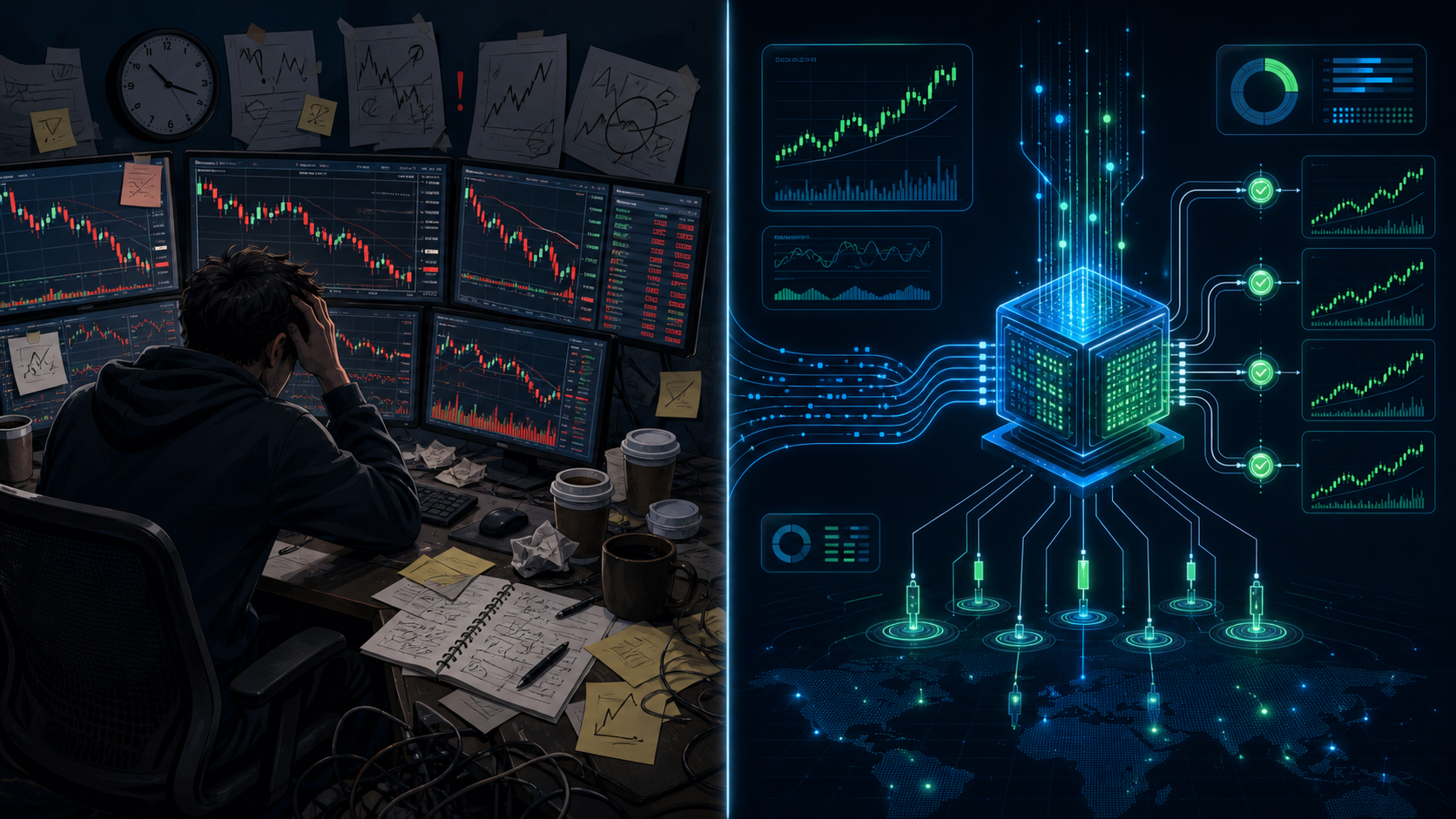 (Manual Emotional Trading vs. Systematic Algorithmic Execution)
(Image generated by AI)
2. Why Shoonya (Finvasia) is Ideal for Beginners
When embarking on your algorithmic trading journey, one of the biggest initial hurdles is transaction costs and API subscription fees.
Many traditional and discount brokers in India charge:
- API Subscription Fees: Anywhere from ₹500 to ₹4,000 per month just to access their trading API and market data feeds.
- Brokerage Fees: ₹20 per executed order (which equals ₹40 for every complete buy-and-sell round trip).
The Math of Brokerage Drag
Let’s say you are testing a beginner momentum strategy that takes 4 trades a day across 20 trading days in a month:
- Total Orders: 4 trades/day × 2 (buy + sell) × 20 days = 160 orders.
- Standard Brokerage: 160 × ₹20 = ₹3,200/month.
- API Subscription Cost: ≈ ₹2,000/month.
- Total Fixed Overhead: ₹5,200 per month before you even make a single rupee in profit!
For a beginner starting with a testing capital of ₹25,000 to ₹50,000, fixed overhead of ₹5,200 translates to a 10% to 20% guaranteed drawdown every single month.
Standard Broker Model:
[ ₹2,000 API Fee ] + [ ₹3,200 Brokerage ] = ₹5,200 Monthly Friction ❌

Shoonya (Finvasia) Model:
[ ₹0 API Fee ]     + [ ₹0 Brokerage ]     = ₹0 Monthly Friction     ✅
Shoonya by Finvasia eliminates this friction entirely:
- Lifetime Zero Brokerage: ₹0 on Equity Delivery, ₹0 on Equity Intraday, and ₹0 on Futures & Options (you only pay statutory government taxes like STT, GST, and exchange turnover charges).
- Free API Access: Zero monthly subscription fees for API access, live WebSockets, and order routing.
- SEBI & Exchange Registered: Fully regulated broker compliant with SEBI and exchange mandates.
This makes Shoonya one of the most cost-effective platforms for developers, students, and quantitative traders who want to build, test, and iterate on algorithms without paying monthly platform rents.
3. The 4 Credentials You Need to Get Started
Before you write your first line of automation code, you must obtain four key authentication credentials from your broker.
                                  +------------------------------+
                                  |  Shoonya Trading Account     |
                                  +------------------------------+
                                                 |
                                                 v
                                  +------------------------------+
                                  |   PRISM Client Portal        |
                                  |   (API & Security Section)   |
                                  +------------------------------+
                                                 |
         +-----------------------+---------------+-----------------------+
         |                       |                       |                       |
         v                       v                       v                       v
+------------------+   +-------------------+   +-------------------+   +--------------------+
| 1. User ID       |   | 2. App Key        |   | 3. Secret Key     |   | 4. TOTP Secret     |
| (e.g., FN123456) |   | (Vendor Code)     |   | (64-char String)  |   | (32-char Base32)   |
+------------------+   +-------------------+   +-------------------+   +--------------------+
Let’s break down each credential, why it exists, and how to locate it:
1. User ID (Client ID)
-
What it is: Your primary 6 to 8 character trading account identifier (e.g.,
FN123456). - Where to find it: Sent in your initial account activation email and displayed on your Shoonya web/mobile dashboard.
2. App Key (Vendor Code)
-
What it is: An application identifier that tags your API requests. Typically formatted as your User ID followed by
_U(e.g.,FN123456_U). - Where to find it: Generated inside the PRISM portal under the API Key management dashboard.
3. API Secret Key
- What it is: A high-entropy 64-character alphanumeric string generated specifically for your API application. This acts like your application’s private master password.
- Security Tip: Never share this key or commit it to a public GitHub repository.
4. TOTP 2FA Secret Key (Authenticator Key)
- What it is: A 32-character Base32 string provided when setting up Time-based One-Time Password (TOTP) two-factor authentication (using Google Authenticator or Microsoft Authenticator).
- Why it matters: Under SEBI guidelines, static passwords alone are strictly prohibited for financial API logins. Your code uses this secret key to mathematically compute the dynamic 6-digit TOTP on the fly.
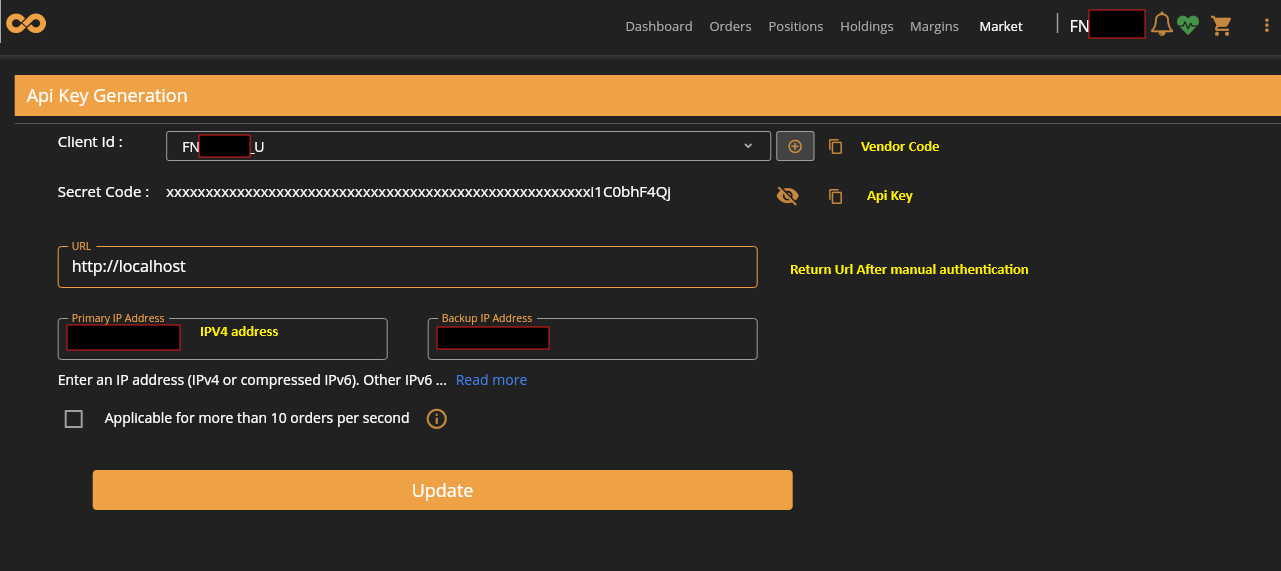 (Navigating the PRISM Developer Portal to Generate API Keys and Whitelist IPs) (Actual Dashboard from Shoonya)
4. How the Login Flow Works (In Plain English)
Older trading APIs allowed bots to log in by simply posting a username and password in plaintext. To protect retail investors against unauthorized access and credential theft, modern financial systems utilize OAuth 2.0 Token-Based Authentication.
Here is how the 3-step security handshake works:
[ Step 1: User Browser ]
       |
       |-- 1. Opens OAuth URL & signs in with User ID, Password & 6-digit TOTP
       v
[ Shoonya OAuth Gateway ]
       |
       |-- 2. Validates credentials & issues single-use Auth Code (?code=XYZ...)
       v
[ Your Trading Application ]
       |
       |-- 3. Exchanges Auth Code + App Key + Secret Key for 24-Hour Session Token
       v
[ Shoonya Trading API Engine ]
       |
       +--> Connected! Ready for live data streaming and trade execution.
The 3-Step Lifecycle:
- Morning Authorization: Once each trading morning before market open (around 9:00 AM IST), you initiate the authentication handshake via your browser.
-
Single-Use Authorization Code: Upon successful verification of your User ID, password, and TOTP, the gateway redirects to your designated redirect URL (e.g.,
http://localhost/?code=abc123xyz...). This authorization code is temporary and single-use. -
Session Token Generation (
GenAcsTok): Your software grabs this authorization code, combines it with your App Key and SHA-256 encrypted credentials, and makes an HTTP POST request to the/GenAcsTokendpoint. The server responds with a secure Session Token (susertoken).
💡 Key Advantage: Once you have obtained the
susertoken, it remains valid for 24 hours. Your application can disconnect, restart, or run all day using this token without requiring you to log in again via the browser.
5. Top 4 Beginner Setup Pitfalls (and How to Fix Them in 2 Minutes)
When configuring their first trading connection, over 90% of beginners encounter one of these four common stumbling blocks. Understanding why they happen will save you hours of debugging:
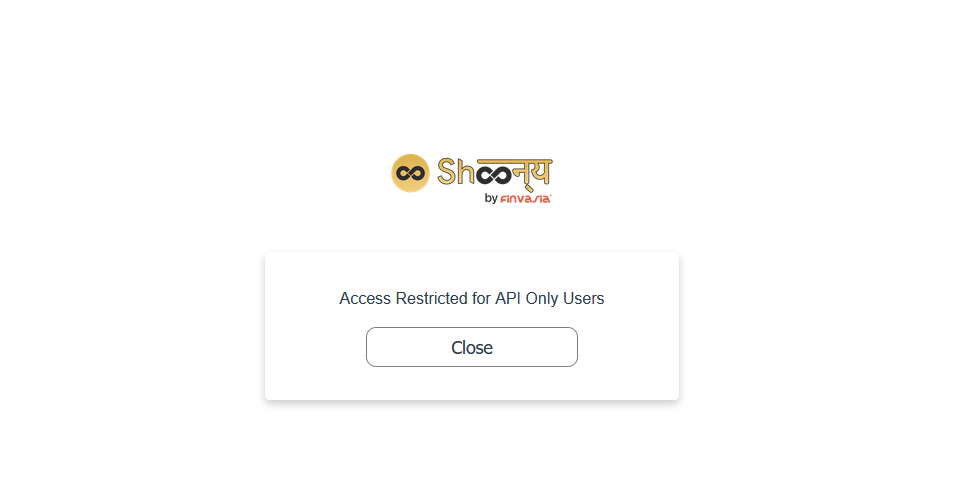 (Common Network and Authentication Pitfalls and Their Instant Fixes) (Actual Error Screenshot from Shoonya)
❌ Pitfall 1: "Access Restricted for API Only Users"
-
The Symptom: When opening the login URL, the browser immediately displays a white screen with the error message:
Access Restricted for API Only Users. -
Why it happens: When setting up API access in PRISM, you whitelisted your home network’s IPv4 address (e.g.,
122.161.45.10). However, modern Internet Service Providers (JioFiber, Airtel Xstream, etc.) and modern operating systems prioritize IPv6 by default. When your browser connects via IPv6, the Shoonya server sees an unrecognized IP and blocks the request. -
The 2-Minute Fix (Windows):
- Press
Win + R, typencpa.cpl, and press Enter to open Network Connections. - Right-click your active Wi-Fi or Ethernet adapter and select Properties.
- In the list, scroll down and uncheck
Internet Protocol Version 6 (TCP/IPv6). - Click OK. Your computer will immediately route all connections through your whitelisted IPv4 address.
- Press
Fixing IPv6 on Windows:
[ ncpa.cpl ] --> [ Wi-Fi / Ethernet Properties ] --> [ Uncheck TCP/IPv6 ] --> [ OK ]
❌ Pitfall 2: 2FA / TOTP Timing Mismatch
-
The Symptom: The broker rejects your 6-digit TOTP with an
Invalid OTPorAuthentication Failederror even though you typed it correctly. - Why it happens: Time-based One-Time Passwords (RFC 6238) are mathematically computed in strict 30-second time windows. If your local computer’s clock is off by as little as 15–20 seconds compared to global atomic time, your computer generates a passcode that the broker’s server considers already expired or not yet valid.
-
The 2-Minute Fix:
- Open Windows Settings → Time & Language → Date & Time.
- Under Additional settings, click Sync now.
- Ensure your time zone is set to
(UTC+05:30) Chennai, Kolkata, Mumbai, New Delhi.
❌ Pitfall 3: Authorization Code Expiration
-
The Symptom: Your application throws
Invalid TokenorCode Expiredwhen exchanging the authorization code. -
Why it happens: The temporary code generated in the redirect URL (
?code=...) is designed for immediate single-use exchange and automatically expires within 2 to 3 minutes. - The 2-Minute Fix: Copy and paste the code into your bot application as soon as the browser completes the login redirect. Do not leave the browser tab idle for minutes before running your script.
❌ Pitfall 4: Re-Authenticating on Every Single Code Run
- The Symptom: You modify a print statement in your code, restart your script, and find yourself forced to log in via the browser all over again.
-
The Fix: Cache your Session Token! After completing your initial morning login, write the returned
susertokento a local configuration file (such asapplication.propertiesor a.envfile). On subsequent runs, have your code check if a cached token exists before prompting for a new login.
// Example: Checking for cached session token before initiating browser login
String cachedToken = config.getProperty("shoonya.cached.token");

if (cachedToken != null && !cachedToken.isBlank()) {
    System.out.println("⚡ Found valid cached session token. Connecting instantly...");
    apiClient.setSessionToken(cachedToken);
} else {
    System.out.println("🔑 No cached token found. Launching morning OAuth handshake...");
    String newToken = apiClient.performOAuthLogin();
    config.saveProperty("shoonya.cached.token", newToken);
}
6. The Golden Rule: Always Start with Paper Trading (Dry Run)!
[!IMPORTANT] Never connect real capital to automated trading code on Day 1. Even a mathematically sound, backtested strategy can wipe out capital if a minor software bug triggers an infinite loop or places duplicate orders during network hiccups.
                               +----------------------------------+
                               |     Live Exchange Tick Stream    |
                               +----------------------------------+
                                                |
                                                v
                               +----------------------------------+
                               |   Your Strategy Engine Logic     |
                               +----------------------------------+
                                                |
                        +-----------------------+-----------------------+
                        |                                               |
                        v                                               v
          [ Real Trading Mode: DANGEROUS ]               [ Paper Trading: SAFE & SMART ]
          - Places real market orders                    - Simulates execution internally
          - Risk of software bugs causing losses         - Logs entry, target & stop-loss
          - Capital at risk on Day 1                     - Verifies logic with ₹0 risk
Before enabling real live order placement, every quantitative trader runs a Paper Trading (Dry-Run) phase for at least 2 to 4 weeks:
1. Simulate Order Execution Internally
Keep your WebSocket connection active so you receive real, live market prices from the exchange. When your strategy generates a “BUY” signal, instead of sending an HTTP POST order to the broker, log the trade details to your console and database:
- Ticker Symbol (e.g.,
RELIANCE,TCS,INFY) - Trigger Price & Timestamp
- Theoretical Stop-Loss (e.g., -0.5%)
- Theoretical Profit Target (e.g., +1.0%)
2. Maintain a Trade Audit Journal
At the end of each trading session (3:30 PM IST), analyze your simulated log:
- Did your stop-losses trigger at the expected prices during sudden volatility spikes?
- Did network disconnections cause any missed tick updates?
- Were there any unintended duplicate orders generated during candlestick formation?
3. Implement an Automated Circuit Breaker (Kill-Switch)
Before ever going live, build a hard-coded risk manager into your bot:
IF (Daily_Realized_Loss >= ₹1,000) THEN
    1. Cancel all open pending orders.
    2. Close existing open positions.
    3. Disable order placement for the remainder of the day.
    4. Send an emergency alert notification.
END IF
This ensures that even during unexpected market flash-crashes, your trading account is mathematically protected from catastrophic drawdowns.
7. Next Steps: Building Your Trading Journey
Once your basic connection is verified, your credentials are secured, and your paper trading engine runs smoothly, you can begin exploring popular strategy archetypes:
-
Opening Range Breakout (ORB):
- Identify high and low price levels established in the first 15 minutes of the trading day (9:15 AM – 9:30 AM).
- Trigger a long entry if the price breaks above the 15-minute high with expanding volume.
-
VWAP Mean Reversion:
- Calculate the Volume Weighted Average Price (VWAP).
- Identify overbought or oversold intraday deviations and trade back toward the mean.
-
Multi-Timeframe Trend Following:
- Combine higher timeframe trend filters (e.g., 200 EMA on 1-hour chart) with lower timeframe execution triggers (e.g., 9/21 EMA cross on 5-minute chart).
8. Summary Checklist for New Algo Traders
Use this pre-flight checklist before launching your automated trading system:
- Shoonya Account Active: Account verified with 2FA TOTP configured on an authenticator app.
-
PRISM Credentials Generated: User ID, App Key (
<USER>_U), and 64-character Secret Key saved securely. - Network Whitelist Configured: Public IPv4 address whitelisted in PRISM; IPv6 disabled on network adapter if encountering restriction errors.
- System Clock Synchronized: Windows/Linux system clock synchronized to internet atomic time.
-
Session Caching Active: Single morning login caches
susertokenfor 24-hour operation. - Paper Trading Verification: Strategy tested in simulated dry-run mode for a minimum of 10–15 market sessions.
- Hard Kill-Switch Enforced: Daily loss limit circuit breaker tested and operational.
Conclusion
Algorithmic trading is not a get-rich-quick scheme—it is a systematic, disciplined engineering approach to the financial markets. By leveraging modern zero-brokerage APIs like Shoonya, setting up secure OAuth 2.0 authentication, and enforcing strict paper-trading risk management, you eliminate the emotional traps of manual trading and build a foundation for long-term trading consistency.
Stay tuned for our upcoming technical deep dives where we will write step-by-step Java and Spring Boot code to stream live WebSocket ticks and execute automated breakout strategies in real-time!